Join The Community

Premium WordPress Themes

Showing posts with label Tips And Tricks. Show all posts

Wednesday, February 9, 2011

Understanding Domain and Hosting

In the world of website or blog, certainly you often hear the term of domain or hosting. Domain and hosting are the essential things for a website or blog. Therefore, let’s know and understand what domain and hosting are. For those of you who are not familiar yet with domain and hosting, below is the discussion that Kang Rohman can deliver to you.

  • Domain
In creating a website or blog, you are obligated to have the domain. What is domain?
Maybe you have ever heard about this term in other fields such as math or others. If we observe the general definition, domain means a place or the territory. It will be the same as in the internet; you need to have a place for your website or blog. To differ from one domain with another domain, the domain should be given a name, or we call it the domain name, e.g. http://kangrohman.com, http://berandaku.com, http://blogspottutorial.com, etc. In the popular term, the domain name refers to Domain.
The Domain name is various according to the goal of a website created. The types of domain are specified with the words after it such as:

  • .com  ( read: dot com ) : for commercial website
  • .org  : for organization website
  • .info : for website contains information
  • .biz : for business website
  • .gov: for government’s website
  • etc
There are also domains tend to territory:

  • .us : for website in the United States (US)
  • .co.id ( read : dot co dot id ) : for website in Indonesia
  • .cn : for website in China
  • .co.il : for website in Israel
  • .my : for website in Malaysia
  • etc
However, in the practical, the domain names are no longer for the specified identities, for instance, the domain name ends with .org, used for personal website not for an organization, domain name ends with .info, used for commercial, and so on.
To purchase the domain, you can buy it at the websites that sell domain. This purchase is not permanent, but for a period in years (usually, the price will be for one year). Or precisely, we hire the domain, not buy. But it is more popular to buy a domain not hire a domain.
In the domain, there’s something called Sub Domain (part of domain). The Sub-domain is created of the main domain. The Sub domain can be identified from a separate written by dot (point). For instance, the main domain is kangrohman.com, we can create the sub-domain as blog.kangrohman.com, tool.kangrohman.com, nangkring.kangrohman.com. Or the real example for you is like kolom-tutorial.blogspot.com. Main domain is blogspot.com and the sub domain is kolom-tutorial.

  • Hosting
If you have bough a domain and you access the domain, it will be a blank page. In order to fill out the domain, we will need a hosting to store the database, web machine, etc.
An easy illustration, domain is like a computer and hosting is like the electricity. Both are to support each other. Or another example, the laptop with its battery. So, a website should have the domain name and hosting so it can be accessed by public.
To create a webhosting, you will need the very expensive tools, therefore, a webhosting company are present to give the space or bandwidth. You can find many webhosting companies on the internet.
Hiring a webhosting is usually fixed to 3 months, 6 months, 1 year, 2 years, etc. One webhosting is certainly different from another one.
That’s all today’s post. Next posts, I’ll try to discuss about how to buy a domain, select domain name, select the right hosting, etc.
If there’s a mistake in writing and explaining about domain and hosting, please correct. Thanks.

Add Google Talk to Blog

google talk
I'm sure you are surely knew what is the Google Talk, with Google talk you can send instant messages, make voice calls, leave voice mail messages, transfer files and etc, however of course must with other Google user. Do you know, now you can add Google talk to your blog? not yet known its way? please follow the steps following :


  1. Login to blogger with your ID.
  2. After entering the dashboard page , click Layout. Please saw the picture :
  3. layout
  4. Click at Page Element tab. See the picture below :
  5. page element
  6. Click at Add a Page element.
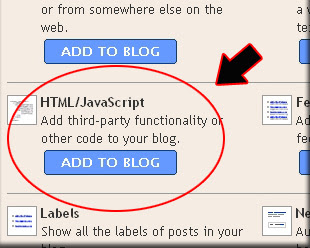
  7. After emerging pop up window , Click add to blog button for the things HTML/JavaScript. See the picture following :
  8. javascript
  9. Copy and paste the code below into available column :
  10. Click   save changes   
  11. Finish. Please see the result.

Now you have a Google Talk at your blog. Or maybe you still confused with the step above? don't worry i have an easy way to do it, just click the button below, login to your blog and the widget will be add to your blog automatically:


See you next time at my new post brother.

Tutorial in creating blog in Blogspot

1. What is Blog?

Blog is short for "Web log", which is a a web application containing note or writing that are usually called "post" and displaying on the web pages. The posts are often displayed orderly based on the age or based on the time when the writing is written and published, so when you view a blog, you will first find the latest posts, top to bottom of the web page and the first to the last page, if the blog has had more than one web page.
For the first time, blog was created as the online private notes, but along with its development and popularity, blog has various types of contents or writings such as tutorial (e.g. this blog), sharing, business, etc. In general, blogs seem not to have the difference with the sites on the Internet.
The blog platform or used to be called blog machine has been created in such a way by blog designers or developers in order to be user friendly, so the knowledge of HTML, PHP, CSS, etc that was a must to create a web application, now with blog, everything is so easy as 1, 2, 3.

2. How to create blog in blogspot

One of the free blog providers that is quite popular today is blogspot or blogger, where you have to register through blogger.com and you get the domain name as sub domain of blogspot, e.g. yourname.blogspot.com.
Why should you create blog in blogger.com, not in other free blog providers? Actually, there is no “should”, but blogger.com has more advantages than other providers do. One of the advantages is the easiness in operating so that blogger.com is good for the beginners. Other advantages are the freedom in editing and replacing the templates to make the best display, custom domain which means that you can replace the domain with your own but with the blogspot hosting, e.g. yourname.blogspot.com can be changed into yourname.com, but still in the same hosting, i.e. the free blogspot hosting.
It should be emphasized from the beginning that the Internet is highly dynamic, so it is very possible that this practical guide to create blog in blogspot will not be relevant anymore as changes occurring, whether to the platform, coding, or anything else that you see right now in blogger.com
To reduce something unneeded to write, below is how to create blog in blogger.com.

Creating Email

One of the conditions required in creating blog is to have an active email address. If you do not have an email, please register at gmail. Since Blogger is one of Google services, when you want to register at Blogger, you had better use Google Email or gmail. If you need a simple guide to create an email, please use Google search engine to search for the best guide.

Sign up for a blog at blogger 

  1. Please visit http://www.blogger.com
  2. After registration page open, go to the right bottom of the page where you can change the language to your own to make you easier to understand the instructions, but in this tutorial, I use English for more global targeting. Please login by using your username and password of your gmail (your email account is allowed to use for login to blogger). login t -blogger
  3. Click "CREATE A BLOG" button
  4. Enter your Blog Title in the field next to "Blog Title", and your expected blog address in the field next to “Blog address (URL). Need to remember that when you enter your expected blog address, you have to be sure of it as you cannot replace it in the future, except you use Custom Domain facility. Check for the availability. If your expected blog address is not available, replace with your new one and so on until you get it. Then type the character you see next to "Word verification", below blog address point and click CONTINUE for the next steps. name-your-blog
  5. Choose a starter template, meaning that you can replace this template in the future and then click CONTINUEchoose a starter template
  6. You will see "Your Blog has been created!" meaning that now you have a blog and you are ready to start Blogging, by clicking "START BLOGGING".  start blogging
  7. You will soon be in the post editor, where you can write anything as you may have thought about before. (it is recommended to directly write for your first post to avoid "Blogger Anti-Spam Robot" that can result in your blog locked. For instance, you can write a very short entry if you have not prepared an entry: "Hello World!", and anything else you want. Click "PREVIEW" button to view how your post will be displayed, then click "PUBLISH POST" if you want your entry to be published. post-editor
  8. Click "View Post" to see your blog. Below is the example of the blog display created
  9. Done
For the first phase, your blog is ready and accessible for public. For next discussions about blogging in blogger are to come.

Easy monetizing of your blog with AdSense

Why should I monetize my website?

The more success you have with your blog / website, the more time and money you're going to invest to update it and host it properly.
At some point you may think: wouldn't it just be nice to have my site pay for itself?
Well, that is actually easier to achieve than it sounds! A decent hosting plan should cost you no more than $6.95/month. However, that's quite a low figure here and most people make many many times more than that in ad revenue...
By properly monetizing your blog site it is actually possible to have it pay, not only for the hosting, but also for the time you spend working on it.

Why AdSense?

First, because AdSense is a very simple and proven solution that already pays for hundreds of thousands of blogs/websites accross the world!
Also, AdSense is provided to you by Google which not only makes it reliable but also trustworthy. Once you have earned money from Google, you can actually trust them to pay it to you!
Finally, because the ads will be contexual, i-e they will be relevant to the content of your blog/site. This way, your visitors will not be offended for seeing the ads on your site.

How do I get started?

It's as simple as that:
  1. Sign up with Google AdSense. (It's totally free!) Then follow the provided instructions to put a little javascript snippet onto your blog skin or any web page you like. You may use our b2evolution AdSense plugin to make this even easier.
  2. When visitors view your site they see contextual text ads that automatically adjust to the contents of each page / blog post so that they are always relevant. No flashing images, just relevant text links! :)
  3. When a visitor clicks on an ad link, Google records the click and you get paid for it. Get ready for a monthly check from Google ;)

Will it ruin my blog design?

You can choose the exact position and colors of the text ad blocks you place on your site.
Below are two examples of blogs that incorporate text ads and successfully pay for themselves. Judge for yourself:
  • Example 1: Ad links at the end of the blog post.
  • Example 2: Ad links at the top of the page.
    Note: as you can see, AdSense is not limited to English!

Tuesday, February 8, 2011

Top 25 SEO Blogs

I love rankings, what can I say. After I published the “Top 25 Blogs About Blogging” list I thought that someone would replicate it for the SEO sphere. But no one did, so here we go again.
This list was made using pretty much the same algorithm (only small modifications were made, mainly due to the fact that SEO blogs are more popular). Once again the list should be useful because it is based on objective factors. There are many “Top SEO Blogs” lists around the web, but most of them are based on the preferences of the author.
The Top 25 SEO Blogs list, instead, ranks the blogs according to their Google Pagerank, Alexa rank, number of Bloglines subscribers and Technorati authority. Each factor has a score from 0 to 10, and the maximum score for each blog is 40. Details about the algorithm can be found below the table.


#1 Search Engine Land
7 10 9 10 36
#2 SEOBook 6 10 10 10 36
#3 SEO Moz 5 10 10 10 35
#4 Matt Cutts 7 10 8 10 35
#5 Search Engine Watch 7 10 10 7 34
#6 Search Engine Roundtable 7 10 8 8 33
#7 Search Engine Journal 7 8 9 8 32
#8 Online Marketing Blog 6 7 7 10 30
#9 Pronet Advertising 7 7 5 10 29
#10 Marketing Pilgrim 7 8 6 8 29
#11 SEO Chat 6 10 4 6 26
#12 Search Engine Guide 7 8 4 6 25
#13 SEO Blackhat 6 8 6 5 25
#14 Stuntdubl 6 6 6 6 24
#15 Graywolf’s SEO 6 7 4 7 24
#16 SEO by the SEA 6 4 5 5 20
#17 Link Building Blog 5 5 5 4 19
#18 Jim Boykin 5 6 4 4 19
#19 SEOpedia 6 5 4 4 19
#20 DaveN 6 5 4 4 19
#21 Bruce Clay 5 7 3 3 18
#22 Blue Hat SEO 4 6 3 4 17
#23 Tropical SEO 5 5 3 4 17
#24 SEO Refugee 5 6 1 3 15
#25 Small Business SEM 5 4 3 3 15


Blogs considered: the list considers only blogs that have a high percentage of SEO-related content. Topics might range from SEO news coverage to general SEO discussion and link building.
Google Pagerank (0 to 10): the actual Pagerank was used on the algorithm.

Alexa Rank (0 to 10): Ranges were determined based on the Alexa Rank (i.e., 100k and up, 80k-100k, 60k-80k, 40k-60k) and each range was assigned a number (1 to 10).
Bloglines Subscribers (0 to 10): Subscriber ranges were determined (i.e., 1-50, 50-100, 100-150, 150-300) and each range was assigned a number (1 to 10).

Technorati Authority (0 to 10): Ranges were determined based on Technorati’s Authority rank (i.e., 1-125, 125-250, 500-750,750-1000) and each range was assigned a number (1 to 10).

5 Tips for Using Google Webmaster Tools

This is a guest post by Angie Stewart. If you want to guest post on this blog, check out the guidelines here.
Google Webmaster Tools is a free toolset that’s absolutely invaluable for SEO trouble shooting.
It’s pretty simple to set up, you just need to verify that you’re the site owner (there are a number of ways to do this, so just use the one that is best for you) and you’ll have instant access to an abundance of useful information that will help you to improve your website and your search engine optimisation (SEO).
Here are five tips that will get you started:

1. Crawl Stats

Crawl Stats give you information in Google’s crawling activity for the last 90 day period. When you click into this report which is located in Diagnostics, you’ll see three reports:
Pages crawled per day: Overall, it’s a good sign to see this graph going up. Whilst there are peaks and troughs, you’ll be able to see if there is a steady incline, decline or no change at all. Spikes in this report are often due to the introduction of new pages or an increase in inbound links.
Kilobytes crawled per day: This graph should bear some resemblance to the Pages crawled per day graph in terms of the peaks and troughs in the graph.
Time spent downloading a page: This graph will be different from the above two and is likely (hopefully) to not show as many peaks. Peaks on this graph could be a server problem as in the norm, Google should not take very long downloading your pages.
These stats are useful for diagnosing problems and gauging performance issues.

2. Not Found Errors

Not found crawl errors are very useful for usability & SEO. If customers are browsing around your site and finding that links are not taking them anywhere, they’re likely to get annoyed and go elsewhere. This tool (which is accessed on the top right of the dashboard) will identify all not found URLs in your site. Be aware, that this can sometimes be slightly outdated, and Google state:
If you don’t recognize these URLs and/or don’t think they should be accessible, you can safely ignore these errors. If, however, you see URLs listed in the ‘Not found’ section that you recognize and would like crawled, we hope you find the ‘Details’ column helpful in identifying and fixing the errors.
So don’t dwell too much on getting this down to 0 errors in GWT, just use the information to improve site usability.
As well as links from within your site that are leading to a 404, this will also show you links from outside sites that are leading to a 404. This aspect is particularly valuable for SEO. Use this feature in GWT to do is identify the linked to pages within your site that no longer exist and redirect those pages to a real page within your site. This tactic will lead to increased link juice and increased visitors.

3. Meta Descriptions and Title Tags

Google Webmaster Tools will provide you with a list of URLs that have problems in their title tags or Meta descriptions, this list will include duplicates as well as incidences of titles or Meta descriptions that are too long or too short. Go into Diagnostics and HTML suggestions to find this information. Duplicate meta titles, especially can affect your rankings within Google and meta descriptions should be snappy and targeted to each specific page to help CTR of each page on your site.

4. Top Search Queries

Whilst you can get your top search queries out of Google Analytics or whatever analytics tool you use, I particularly like the Webmaster Tools version for the simple reason that it shows your average position within Google as part of the data. This enables you to look at your top search terms by position. The reason this is helpful is that when deciding which keywords to push, I particularly like to focus on the keywords that are currently in positions 2-4 as increases in positions at this level will have the most increased in traffic.

5. Site Links

If your site had a list of links below its Google listing, you can use the sitelink section within Site Configuration to control the links that are shown. You can’t actually tell Google which links to show, but you can block links that you don’t want shown.
These are just a few of the many tools available in Google Webmaster Tools and Google often add new features to this great tool. If you’re not a regular user of GWT, try these features out for size and look around to get used to other features on offer. If you are a regular user of GWT, let us know your favourite features and why.
About the Author: Angie Stewart works at Maginus.com, a multi channel software solutions provider for retail, as part of that Maginus provide ecommerce solutions and online marketing services to support their clients.

Blog Project: 30 Traffic Generation Tips

First of all a big “thank you” for every one who participated. As I said before the number of entries surprised me (and the quality as well, I will definitely apply some of those tips myself).
Now, without further delay, the 30 Traffic Generation Tips:
1. Sridhar Katakam
Keep track of blogs and leave comments on them. A good way to keep the conversation going is to install a MyBlogLog widget and visit the blog of people visiting your site.
2. Ian Delaney
Nothing creates long-term traffic more than value. Consider writing posts with resources or explaining how things work. Useful things get linked to and they get onto del.icio.us, which is far better long-term than a digg front page.
3. Scott Townsend
Inform search engines and aggregators like Technorati (using the ping functionality) when your blog is updated, this should ensure maximum traffic coming from those sources. (check the List of Ping Services)
4. Kyle
Simplify. Pay attention to complex issues in your field of work. It may be a big long publication that is hard to wade through or a concept that is hard to grasp. Reference it and make a shorter “for dummies” version with your own lessons learned and relevant tips. When doing this, I have been surprised to find that the simplified post will appear before the more complex version in search results. Perhaps this is why it results in increased traffic; people looking for more help or clarification on the subject will land on your blog.
5. Grant Gerver
Try to be polemic. I write obsessively about all-things political from the left-wing perspective in the form of humorous, sarcastic one-liners.
6. Daniel
A simple tip that will probably boost your page views: install a translator plugin. I decided to use a paid plugin for this, but if I am not wrong there are some free ones as well. The translation is not very good, as you can imagine, but it helps to attract readers that are not fluent in English.
7. Rory
Submit articles to blog carnivals (http://blogcarnival.com) that are related to your niche. Your article almost always gets posted, and it must generate a handful of visitors, at least.
8. Ramen Junkie
Newsgroups. I always see a spike when I post a review to a newsgroup.
9. Eric Atkins
Create a new design for your website. Not only will it be more attractive to your regular readers, but you can submit it to some CSS gallery showcase sites that feature great designs. This will give you exposure on those sites while generating a lot of traffic and backlinks from those types of sites.
10. Megan Taylor
Participate in conversations on related blogs. Start conversations on your own blog. Don’t just post about a story and leave it at that, engage your audience, ask questions and call to action.
11. Guido
Comment on blogs, write useful content and make good friends on forums.
12. Brian Auer
You must be active to generate traffic. I post comments on other blogs that are related to mine, and I post my site link in my signature at the forums. Spread the word about your blog and it will certainly attract readers.
13. Shankar Ganesh
Just browse around MyBlogLog.com and you will surely get visitors to your blog. Also try to join as many communities as possible that are related to your topic.
14. Andrew Timberlake
A great tip for generating traffic is off-line by including your url in all your off-line liturature from business cards, letterheads, pamphlets, adverts through in-store signage if applicable. I even have our website on my vehicle.
15. Cory OBrien
Read lots of other blogs. Leave trackbacks. Make sure your blog is optimized for search engines. Leverage social bookmarking sites like digg (both for new ideas and for traffic).
16. Jester
Leave comments on other blogs. If you’re already reading them, it takes
just a couple of seconds to leave a message agreeing or disagreeing
with the author, you get to leave a link to your site, and you will almost
ALWAYS get traffic from your comments.
17. Goerge Manty
Post 3-5 times a day. Use ping services like pingomatic or set up wordpress to ping some of the ping services. Engage your readers. Put up polls, ask them questions, give them quizes, free tools, etc. Make them want to come back and tell their friends about you.
18. Engtech
Community. It’s one word but it is the most important one when it comes to blogging. The only “blog metric” that makes sense is the vibrant community of readers it has. Building a community around your blog will bring you increased traffic, but how do you start? The boilerplate response to building traffic is always “SEO, social networking sites, and commenting on blogs” but it can be simplified to “be part of a community”. The easiest way to seed your blog is with an already existing community. But the only way to do that is to be part of the community yourself.
19. Chris
Squidoo Lenses are a good way to generate traffic. By using a lense,
you can generate your own custom “community” of webpages, including some
of the more popular pages in your “neighborhood.” Including your own
webpage in such a list is a good way of generating traffic.
20. Splork
I’ve had good success writing articles and submitting them to EzineArticles. Articles that have been written from well-researched keyword phrases and accepted by EzineArticles tend to rank very high in Google for that search term. Placing anchor text in the footer of those articles so the reader can visit my relevant website has always increased my site traffic.
21. Jen Gordon
I came upon some unexpected traffic when my blog popped up on some css design portals like www.cssmania.com and www.webcreme.com. If you can put some time into the concept behind and design for your blog, I’d recommend submitting your site to a design portal not only for
additional traffic but to build an additional community around your site.
22. Kat
I’ve recently gotten involved with several “MySpace-like” community sites that focus on my target audience. I share my thoughts in their forums, post intros to my real blog on their system blog and I’ve even created a group for my specific niche. It’s been very, very successful for me.
23. Inspirationbit
Well, obviously everyone knows that social bookmarking sites like Digg, del.icio.us, etc. bring lots of traffic. But I’m now submitting some of my articles to blogg-buzz.com (a digg like site for bloggers), and I always get not a bad traffic from there.
24. Mark Alves
Participate in Yahoo Answers and LinkedIn Answers where you can demonstrate your expertise, get associated with relevant keywords and put your URL out there.
25. Tillerman
Be the first to write a post about the ‘Top Ten Blogs’ in your niche. The post will rank highly in any general search for blogs in your niche and other bloggers in your niche write about the post and link to it.
26. Nick
Participating in forums is a great way to get loyal readers. Either link baiting people in your signature or posting great advice and tips will give you high quality traffic, which will result in return visitors.
27. Brandon Wood
A simple trick I’ve used to increase traffic to my blog is participate in group writing projects. In fact, that’s what I’m doing right now.
28. Alan Thomas
Don’t forget your archives. I just posted a roundup of all interviews I did over the past seven months. One of them generated a new link and a big traffic spike from a group of users that look like they will be loyal readers now.
29. KWiz
Write something controversial. I don’t think it’s good to write something controversial just for the purpose of getting traffic necessarily (especially if it’s only for that purpose and you’re being disingenuous), but it works.
30. Dennis Coughlin
Find the best blogs on your niche and contact the authors. Introduce yourself and send a link of your blog. This might help them to discover your blog, read it and possibly link to it.

What Is A Blog?


It is 2008; do we still need to ask ourselves what a blog is? I think so, and for two reasons. First of all we still have many misconceptions about blogging floating around the web. Pretty much every week I get at least one email from someone asking if I believe blogging has a future. My answer is always “as long as the Internet has a future, blogs do too.” You will see why I answer that below.
You also have countless articles being published every week where the author suggests that blogs are obsolete, and that the next big thing is micro blogging, or lifestreaming or something else. Again I don’t agree with any of those predicted trends.
The second reason for trying to define what a blog is in 2008 (many people have already done that in the past after all) is because blogging is a social phenomenon. As such, it is constantly evolving, and what was true two years ago might not be anymore.

Blogs Aren’t Necessarily Personal

The main misconception regarding the definition of blogs comes from people that associate blogs with their content. More specifically from people that associate blogs with the content from one particular type of blog: personal blogs.
In other words, those people think that blogs are online diaries where people share their opinions, ramblings and personal events.
Wrong!
That is just one of the things that you could do with a blog.
Today blogs are being used for all sorts of purposes. You have companies that use blogs to communicate and interact with customers and other stake holders. Newspapers that incorporated blogs to their main website to offer a new channel for their writers. Individuals that created a blog to share with the world their expertise on specific topics. And so on.

Separate The Content

If you separate the content from the website, it becomes much easier to work with the definitions.
Consider a person that wants to publish a Questions & Answers column online. She could use several types of websites for that purpose.
She could create an online forum, for example, where each thread would be an answer to a specific question. She could create a static HTML website and publish all the questions and answers on a single page. She could create a wiki where users would be able to edit the questions and answers directly. Finally, she could also create a blog where each post would contain a question and its answer.
As you can see, the content is not attached to the website. The picture below illustrates that (note that only four types of websites were used, but there are many more).

Obviously one type of website will be more suitable for a certain purpose than others. It would be easier for a company to use an online forum on its customer support section, for instance.

So What Is A Blog?

A blog is basically a type of website, like a forum or a social bookmarking site. As such it is defined by the technical aspects and features around it, and not by the content published inside it.
The features that make blogs different from other websites are:
  • content is published in a chronological fashion
  • content is updated regularly
  • readers have the possibility to leave comments
  • other blog authors can interact via trackbacks and pingbacks
  • content is syndicated via RSS feeds
Keep in mind that it is the bundle of those features that should define a blog. An online forum could also offer an RSS feed for example, but that would not make it a blog.

What Is Your Definition?

As I mentioned on the beginning of this article, blogs represent a social phenomenon, so they are in constant evolution. The Internet itself is changing very fast, so pin pointing a single definition for blogging is a hard task.
The definition above is my personal one, and I am sure that other people will want to add or remove details to it. Some might even completely disagree.
That is why I decided to turn the mic to the readers. I want to hear what you think a blog is. What characteristics define it? Is the definition changing over time?

5 Unique Ways To Get Backlinks

Getting a ton of quality backlinks can take forever and most people just don’t have the time or patience to wait that long. There are many great ways to get backlinks such as; blog commenting, forum posting, article submissions, social bookmarking and guest posting, but the problem with these backlink building methods is that you will end up spending too much time away from your site and more importantly your readers. Wouldn’t it be nice if getting backlinks could be set on autopilot?
Great news, there is a way you can set your link building on autopilot that only requires you to do a minimal amount of upfront work. Before I get into the methods that will put your link building on autopilot I want to make sure you understand that this entire method revolves around good quality content.
Remember, “Content is king”!

1. Utilize Yahoo Answers

If you have been building backlinks to your site then I bet you know that Yahoo Answers is really a No-Follow site, right? Well to tell you the truth, it is, but that isn’t the reason you want to post answers on Yahoo Answers. The reason you need to post on Yahoo Answers is because there is a piece of software out there called WP Robot that when placed on a blog has a tool that pulls Yahoo Answers off Yahoo and places it on their site.
Do you get why this is beneficial for you?
Getting links is not that tough. All you have to do is answer questions that have a descriptive title such as, “How do I make money online?” or “How can I lower my car insurance premiums?”. The reason you need to answer questions with a large niche in the title such as making money online, insurance, weight loss or whatever is so you have more people pulling Answers from Yahoo onto their site.

2. Create A Multiple Series List

There are a few reasons to create a multiple series list and all three reasons combined work very well to get backlinks and traffic. The first reason multiple series lists work is because readers can follow along better with a list, they are just easier to scan and make learning less complicated. The other reason why multiple series lists get more backlinks is because people love to link to lists and the more lists you have the more backlinks you will get.
Example: If you write a 3 part series titled, “15 ways to get more traffic through Facebook” I would be a fool to only link to one part on my blog, so instead I would need to link to all three. I don’t know about you but I would much rather have three links pointing to my site as opposed to just one.

3. Add Information To Wikipedia

This is something I tested a while back and it works beautifully. Wikipedia is the biggest online encyclopedia and has over 3 million articles just in the English language. This is why finding a page to edit is very easy to do.
Here is how it works, you first need to find a page that can use some editing (I recommend finding a page that doesn’t have a lot of content but has a decent foundation to go off of). Once you have found the page you want to edit and that relates to your site you need to make sure that you have an identical topic on your site so that you have a reason to link to your site.
Example of identical topics: If you had a site about blogging then I great page to edit would be the page of Problogger, Darren Rowse(considering you had something new to add). Now in order to make it every more closely related I would try to get an interview with Darren that way I could fill in some missing parts to his Wikipedia page. After I have done that I can edit the page, insert my website link and wait.
Something that you must know is that like Yahoo Answers Wikipedia is a No Follow site so the entire point of using Wikipedia to get people to see the article on your site and link to that instead of the actual Wikipedia page.

4, Exchange Site Links For Content

Something that I have done quite a bit for my niche websites is exchange site links for written content. This isn’t guest posting, this method involves a site owner placing a link back to your site in order for you to write a specified number of articles.
The reason this works is because site owners want to get more content whether it is to submit to article directories, sell or just put on their site. I know this may not make a lot of sense to you now but it will. If you spend enough time on forums then you will notice that not everyone wants to buy content for a decent price, so all you have to do is tell the person wanting to buy the article that you will write 1 article each month in exchange for 1 link on their site. Trust me, people like to do this.

5. Give Away A Gift

My favorite way to get backlinks is to actually put out some link bait(AKA give away a gift). The link bait I always put out is a $25 gift card for Amazon.com. Everybody wants to get the free gift card so I tell my readers that all they have to do is link to my site and they will be entered into the drawing for the $25 gift card.
How I set it up: Since I want to get traffic and not only links I make the requirement that in order to be entered into the drawing the linking site needs to send at least 5 visitors having all different IP addresses and anything over 5 will count as another entry into the drawing. Think about it, if you only get 3 links from quality sites it would probably cost you around $200 per month for those links, but instead you only pay $25 with the hopes that the site owner keeps your link up for the chance to win another gift in the coming months.
The biggest different between these 5 unique link building methods and the normal link building methods is the fact that these are a more set and forget type thing while the others have to be catered to constantly.
About the Author: Adam Snyder is a blogger, freelance writer, and internet marketer who loves the online lifestyle. He has been making money online for over 4 years now and is passionate about teaching others the methods that he uses to make money. If you want to see the techniques he used make sure you check out DormRoomCash.com.

Revised 30 SEO Tips in 30 Days

Explained in Google Knol (Won best knol of the Month March 2009 & Top Pick Knol Award)

Having less time to do SEO by your own :) do not worry, now you have a chance to turn your website SEO ready in just 30 days by applying one SEO tip a day? Here are those 30 SEO tips

Tip [1] Add Titles related to targeted keywords, place only important keywords, do not exceed more than 25 characters
Tip [2] Meta description should be unique for each pages with targeted keywords. Do not stuff keywords into Meta description.
Tip [3] Layout pages with CSS, avoid tables
Tip [4] Add Keywords towards H1 tag as page headlines.
Tip [5] Implement Bread crumbs for increasing web site navigation structure example Home >> Service >> SEO
Tip [6] Create Static Header and footer navigation links, Links should be text not as images
Tip [7] Analyze your targeted keywords using Google suggest
Tip [8] Keywords in navigational links play a vital role and have its own importance to search engine eyes
Tip [9] Use most important keyword in file name or URL
Tip [10] Minimize table especially nested tables
Tip [11] Say yes to Quality links and No to Quantity links
Tip [12] Never try to place hundreds of link for a new site on the very first day
Tip [13] Your targeted keywords need to vary a lot in anchors
Tip [14] Always have a good combination of links from new and old sites
Tip [15] Try writing articles having links and have them in the resource page of your site
Tip [16] Images are important, make sure your site logo contains your keyword
Tip [17] Put CSS and JavaScript into external file / folder
Tip [18] Pay special attention to your content
Tip [19] Make sure to have sitemap as text links
Tip [20] Place robots.txt in root on your server
Tip [21] Create Google site map to your web site
Tip [23] Start a blog and participate with other related blogs
Tip [22] Submit site to open directories
Tip [24] Create feed xml and ror xml for xml search engines and directories
Tip [25] Try to avoid automatic directory submission and build manual links
Tip [26] Monitor your hits and traffic by using free Google analytics
Tip [27] Know how to analyze the reports and to optimize the results
Tip [28] Know about redirection methods and theory - 301, 302, and 200 response codes
Tip [29] Implement, understand and react to website analytics reports
Tip [30] Make your body copy sufficiently long and keyword rich

Quick Guide

If you want these SEO tips in your site or blog as Gadget, feel free to use my SEO Tips of the Day Google Gadget that displays one SEO tip a day in your web page which can even help your site visitors to learn SEO tips and to get SEO and other Internet marketing Tweets follow me @jagadeeshmp , thanks for your time

Monday, February 7, 2011

5 Killer Reasons To Buy Structured Settlement

When a person will buy structured settlement he will at the same time plan a part of his financial future. The structured settlement is secure, because a person cannot use it as a loan guarantee, which would eat the value of the program. But if the buyer will need a bigger amount of money, he can always sell the program.
1. The Structured Settlement Quote.
When a person will buy structured settlement he will do a long term commitment. That sets a requirement to the seller, it must be a reputable company with a long track record. A wise buyer uses an experienced expert, who has done these deals for many years and who can guarantee, that the selling company follows legal procedures.
2. The Structured Settlement Plans.
When a person has got the recommended company names and asked some quotes, it is a time to research these quotes to make sure a buyer will get, what he wants. A good news is, that the ROI, which an owner can get, is usually high.
3. The Medicaid.
It is important to guarantee, that the Medicaid qualification is not in danger. To do this many experts recommend that a person will form a so called Needs Trust or Settlement Trust. This makes it possible, that the plaintiff can get the benefits from the settlement without being disqualified from the Medicaid.
4. The Taxes.
As mentioned above the structured settlements offer usually a high ROI, but they have another big benefit, which is that they are tax free. Actually the Government will get the taxes, because the seller buys taxes, which are a part of the selling price.
If you have experiences about other investment instruments, like rents, dividends, wins from the stocks etc. you have to pay taxes from the income. The difference to the settlements is really big.
5. The Role Of The Court.
The settlements are periodic payments, which are decided by the court. These kind of payments can be the lottery wins, insurance payouts or annuities. Because the court makes the original decision, its permission is also needed, when a person will sell the settlement.
When somebody wants to buy a settlement his target is to get a lifelong and regular income stream, which does not need any planning, but is carefree. This financial product fits well to everybody, who wants a good ROI, but it is especially good for people, who has not an ability to plan the financial future, like the minors, incompetent persons and financially unsophisticated plaintiffs.
Sumber: http://satukandunia.blogspot.com

6 Tips on How to Make $500 Dollars a Day with Adsense

Google’s Adsense program provides the perfect way to generate an ongoing passive stream of income for the savvy internet entrepreneur.
It is free to join and easy to set up.

I hear you ask, if it’s so easy why isn’t everyone making piles of money by slapping Adsense code into the pages of their websites.

Well there are a number of factors that contribute to a webmaster’s success with Adsense not least of all having a contextual website.

If you base your quest to make $500 dollars a day with Adsense on the following, you stand a good chance of sustained success.

1. Don’t build a site for Adsense

Apart from being against adsense’s TOS, site’s created purely to carry adsense ads don’t work in the long term.

They will in all likelihood get banned by Google, won’t make money as well as making it difficult for you to open another Adsense account.

2. Build a Site with Content

Sounds obvious doesn’t it, but sites that are interesting and packed with compelling content are more likely to be revisited and related ads are more likely to be clicked upon.

Be sure to use your own original content - sites that duplicate content get penalized by Google.

Remember that rubbish sites generate rubbish income.

3. Choose Your Site’s Topic Carefully

Whilst your site should be based on your business interests or your hobby to keep your motivation levels high, just keep in mind that certain topics will attract higher value Adsense clicks than others.

For example a website on the mating habits of the north sea clam probably won’t attract any advertisers and therefore no Google Ads to display, let alone traffic.

Making money online and web hosting are topics that will never be short of advertisers, however the competition is higher and therefore more difficult to attract website traffic.

4. Niche Market

Your best bet is to target a niche market that does not have the competition in terms of fellow webmasters but still has a certain amount of interest.

Therefore if your website is cameras, targeting “digital cameras” would be a very competitive term, whilst targeting “underwater digital cameras for scuba divers” would be less competitive and will attract targeted traffic as well as related Adsense ads.

It is important that you understand that the text and keywords you use and the placement thereof will influence the type of ads that are served up by Google.

5. Type of Ads and Placement

The placement of your ads on your web page has a direct influence on your CTR (Click Thru Rate) - the higher the CTR the more clicks your ads are generating and the more money you are making.

To this end, take special note of the heat map provided by Google that shows the best positions for your ads on your web pages.

Also decide carefully on the type of ads and the colors that you choose – the type that blend in well with the look, feel and flow of your site will probably be best in silently persuading your visitors to click on them.

6. Traffic Statistics

Finally analyze your adsense traffic stats as they’re packed with useful information – Google provides such a tool for this purpose with your Adsense account.

To make money with adsense you need to know what your stats are telling you and what you need to know.

The amount of traffic your site generates will obviously influence your adsense income but that is a whole separate subject just on its own.

The point is that for 2 sites generating the same amount of traffic, the site that is optimized for adsense, as above, will earn for more in adsense income than the site that isn’t.

Uses of Outdoor LCD Enclosures

Using flat screen TVs out of the home has become a common practice since the rise of the LCD and plasma. These are far easier to mount and use than the old CRT monitors (Cathode Ray Tube) and thanks to the rise of digital signage, LCD displays (and plasmas) are now a ubiquitous sight around shopping malls, concourses, airports and in retail stores.
But indoor locations are not the only places where screens are being installed. Increasingly, more and more outdoor locations are having screens installed, but for what purpose?
Outdoor Digital Signage
There are several reasons why screens are used outdoors and outdoor digital signage has driven much of the demand for outdoor TVs and external LCD enclosure solutions. There are many advantages to using digital signage in an outdoor location, particularly when you consider the potential audience numbers in outdoor locations.
However many people will view an indoor screen, the amount of views the same campaign can receive outdoors is many times greater. Furthermore, there is less digital signage competition outdoors ensuring the advertisements get more notice.
Outdoor digital signage is an effective form of marketing, advertising and branding able to reach similar audience numbers than broadcast media but for a fraction of the price.
In Comparison with static media such as billboards and posters, outdoor digital signage has many advantages. Not only is it flexible, allowing scheduled content and multiple adverts on a single advertising screen, but content can be uploaded remotely saving on the expensive of having new adverts manually pasted up.
Outdoor Information Screens
Another popular use of outdoor screens is to provide information. This can vary from maps and wayfinding, often allowing interactivity by using touch screen displays, to screens placed around bus stops to provide timetable information.
LCD screens are ideal for this because of the real time ability to display information; this means cancellations and important information can be relayed as soon as the information comes in.
As LCD and plasma type screens are flatter than CRTs it means providing this information is a lot easier than before as the screens are not as obtrusive as their CRT predecessors.
Outdoor TVs
Another common use of outdoor screens is exterior TV use. With smoking bans there has been a rise in pubs and bars installing TVs in beer gardens and outdoor areas to allow customers to watch sporting events outside.
And householders are also installing outdoor TVs in their backyards, patios and barbecue areas. The perfect luxury item, by installing outdoor TV families can spend more time outside, enjoying the summers without missing their favourite TV shows.
While many outdoor installations of screens use specific outdoor TVs this is often an expensive method of providing a screen outdoors. A far more cost effective method is to use regular LCD or plasma screens and house them in outdoor LCD enclosures.
LCD enclosures provide all the outdoor protection required for using standard screens outdoors but also provide extremely tough physical protection to deter vandalism and thieves.
By using LCD enclosures, outdoor digital signage, information screens and outdoor TV entertainment can be done on a budget enabling even those on a budget to get involved.
Armagard have nearly two decades of experience manufacturing protective environments for computers, printers and displays. Using this knowledge and experience, Armagard have produced a range of protective outdoor tv enclosure designed for protecting standard LCD and plasma screens in outdoor or hazardous locations - ideal for outdoor digital signage or patio/backyard TV viewing. Our plasma tv cabinet comes with world class warranty.

Analyze Web Traffic With Google Analytics

What concerns many of the online traders, businessmen and bloggers or be it anyone who owns a website in the internet space? The answer would be appropriately said as the traffic to their website. Its not enough that you update your web sites regularly but it is also necessary that you keep a regular note of the traffic that goes through your website daily. Internet traffic is nothing but the number of visits your web site is getting a day or in any period of time held as duration for checking it. Mostly small business men who own a space in the internet do such a checking daily and global players make a note on a weekly or monthly basis.
There are so many web master tools available that could help the web site owners or businessmen to check how the site traffic varies and how to improve the traffic to increase their income. The measurement of such web site statistics comes under what could be called web analytics. There are a number of softwares and add-ons available that could help you keep a close count of the number of hits your site has received in a given period of time. Google analytics is such an application that comes free of any charges from the search engine giants Google Inc. This tool could be used for finding out a number of statistical data regarding the web site such as visits, page views, pages per visit, bounce rates and average time on sites etc.
Besides being an efficient tool for absorbing data regarding web traffic Google analytics could also be used for business research and market research as well. This helps the companies to take the necessary steps to reach out to the masses in a number of improved ways and methods. For instance based on the number of hits a company could direct its advertising either to increase the popularity or to sustain the popularity it has earned amongst the general public. The two common modes of analyzing web data are offline and online modes.
Offline web analytics are performed by service providers who need not own a web site of their own. They do it for companies and corporates who own flashy and business oriented web sites. Online mode is incorporated by small business men particularly ho own web sites and also have time and work men to check on their sites data frequently. With all the many tools available via Google web analytics package there is a better scope for any company to improve their web sites and promote business for a better tomorrow.
You can check browser statistics with the help of Google analytics. Click here to fix the problems with site

Searching for Web Hosting and Free Domains

The truth is, when it comes to researching a online hosting company where do you go? There's more of less more than a million to choose from. So I've decided to report the best of the best and talk about the companies that charge more! So I've started a website.
Now when doing research for the words internet hosting and getting a free domain or "free webname for life" you need to be cautious. Not much in life is ever really free, there is in most cases a price for everything. Although lets be fair there are loads of great internet hosting companies that offer domains for free and also offer outstanding deals. But there are also quite a few web hosting companies that offer web hosting and free domain services but in reality they charge a lot more than the competition. So as you can sort of tell web hosting and free domain can end up being quite a task.
So we decided to search for a website that could show us where we can find the best deals. Unfortunately though after having quite hard time finding anything I decided to make my own blog to help others find web hosting and a free internet name. It's taken quite a while to test out the best but we do have some great reviews and all the names of the companies that are worth joining. Although our search for a real web company seems to really be impossible there are places you can go to get a domain.
Matt Cunningham is an professional in the area of helping people find domains and frequently searches web companies to find the best deals. You can read more about web hosting and free domain at his website http://web-hosting-and-free-domain.com.

Trojan Bohu - The Nightmare of Cloud Antivirus System

It's been a while since the cloud computing security services appeared for the first time as a magical security solution for computer users. If I remember, April 2009 is the moment when Panda Security announced the first Cloud Antivirus software, in Beta stage at that time, a free security solution that benefits of another technology developed by Panda, the Collective Intelligence. In a few words, it's about a huge database built with results of analyzed samples received by Panda Security Labs during years, results that are accessible by all the users from the cloud automatically and almost instantly. To have an idea about the size of this database, consider that Panda analyzed hundreds of millions of samples until now, and the new samples are analyzed and classified in a few minutes.
In this way, in the moment when a new threat is identified, let's say a possible new trojan or virus variant, named sometimes a zero-day malware, the signature and the disinfecting or removing instructions for that new trojan is automatically available for all the users of the cloud antivirus software, beating the common update technology of a classic antivirus.
Theoretically, this approach must lead to a lower computer resource(CPU and RAM memory) consumption, since the files analyzing job is passed to the Cloud servers. Maybe you will ask: What is the bandwidth consumed by this process of submitting files data to the servers, it must be huge? Well, it's not the case, because the scanned files are not submitted to the servers in their integrity, instead hashes of files are submitted.
The hash of a file is like a signature or a fingerprint of a file but very little in size, it's about a few bytes, so the Internet bandwidth is not affected significantly.
Although the software keeps a cached file with malware signatures on the local computer, a cloud antivirus is based on a client-server system and can benefits fully of its technology as far as there is a working Internet connection.
All good until now, when researchers from Microsoft discovered a new trojan, the so-called Trojan Bohu, originating from China, Taiwan more precisely, which seems to neutralize a cloud antivirus detection capabilities regarding the new threats, using several methods.
This trojan first appends several bytes of junk code to its body, making the antivirus detection using the hashes of files impossible and the reason is obvious, the hashes has been modified.
Secondly, the Bohu trojan installs a Network Driver Interface Specification (NDIS) driver and a Service Provider Interface(SPI) for monitoring and filtering the network traffic. When a connection attempt to a an IP or domain known to be used by the cloud antivirus will be detected, the HTTP requests for that IP will be blocked. Separately, the upload process of dubious files to the antivirus cloud servers is blocked.To accomplish this task, the trojan is looking for certain keywords in the HTTP requests, if a keyword is found then the subsequent communications with the sever are supressed. The cloud antivirus will be unable to access the "cloud knowledge" and as a consequence the end users are not protected anymore for the newest threats. This trojan could be the start of a nightmare for the cloud antivirus system developers and a big threat to the technology itself, because it highlights the weaknesses of this security system.
I agree that using these methods, a classic antivirus can also be blocked to update itself, but for a cloud antivirus the connection with the servers is of an utmost importance, it is the heart of its technology.
The Bohu trojan is presented to the supposed victim as a high-definition video player or video codec, of course fake, tricking the user to install it in the computer, so the social engineering is used as method of infection.
During the installation process several files with semi-random names and .xml extension, together with an executable file are dropped in %Program Files%Baidu folder and using these files, a new executable file is generated also with random name, which is the actual body of the Baidu trojan.
For example, Rising AV detect it as:
Dropper.Win32.Bobohu.a
Kaspersky AV as:
Trojan-Dropper.Win32.NSIS.tw
and Microsoft as:
Trojan:Win32/Bohu.A!Installer
to name only a few of its given names.
This newly created trojan will drop other malware files, which are actually its components:
  • siglow.dll
  • siglow.sys
  • newnetgar.dll
  • spass.dll
  • dsetup.exe
... and will add a registry entry with a random name & value to run at computer start-up:
  • HKEY_LOCAL_MACHINESOFTWAREMicrosoftWindowsCurrentVersionRunrandomValue_here
Until now, only 3 antivirus software vendors were affected: Kingsoft, Rising and Qihoo, all from China.
Meanwhile, they solved the problem providing signatures and solutions to neutralize this trojan, but the problem is conceptual and can be resumed in a few words: there is not a 100% reliable solution to protect a computer as far as it goes online, only an up-to-date antivirus, an up-to-date system and the common sense are the things which can protect us. Maybe the last one is the most important, because the common sense tells us to do not install any software in the computer, without knowing its origins and its reputation.
John Barrett, Editor at http://cleanbytes.net.